> ## Documentation Index
> Fetch the complete documentation index at: https://docs.atomicnetworks.co/llms.txt
> Use this file to discover all available pages before exploring further.
# Receiving Credentials After Purchase
> Learn how to find your credentials to connect to your Atomic Networks VPS.
To start using a VPS service with Atomic Networks, you will need access to your login credentials. This guide will explain how to find your credentials after [purchasing a VPS](https://billing.atomicnetworks.co/store/chicago-budget-vps-kvm) service.
Following purchase, you will receive an email with details regarding your new server. Check the email for the address associated with your [Billing Panel](https://billing.atomicnetworks.co/) account.
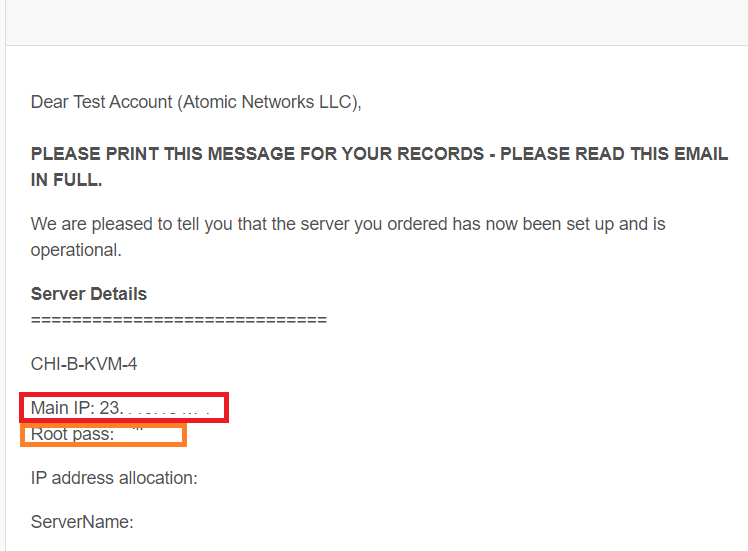 After finding this email, there are a few important things you want to take note of:
* Main IP: You will need this to connect to your VPS.
* Password: If you set a password during checkout, it will be given to you here.
* Username: If you set a username during checkout, it will be given to you here. If you did not set a username, your username is `admin`.
Once you have taken note of these credentials, you can begin the process of [connecting to your VPS](/vps/how-to-connect-to-vps).
After finding this email, there are a few important things you want to take note of:
* Main IP: You will need this to connect to your VPS.
* Password: If you set a password during checkout, it will be given to you here.
* Username: If you set a username during checkout, it will be given to you here. If you did not set a username, your username is `admin`.
Once you have taken note of these credentials, you can begin the process of [connecting to your VPS](/vps/how-to-connect-to-vps).