> ## Documentation Index
> Fetch the complete documentation index at: https://docs.atomicnetworks.co/llms.txt
> Use this file to discover all available pages before exploring further.
# How to Use RCON (GMod)
> Learn about how to configure RCON for your GMod server on an Atomic Networks service.
## Step 1: Navigate to Atomic Panel
Click [here](https://panel.atomicnetworks.co/login) to navigate to Atomic Panel. You can log in using your account credentials that you received following checkout. The credentials email is sent to the email address on file in the Billing Panel.
If you're not a current Atomic Networks client, [claim your Free GMod Server Hosting](https://atomicnetworks.co/garrys-mod-server-hosting) to get started on a GMod server for your favorite gamemode in less than half an hour. If you're already hosting with another GMod service, see [how we offer way more performance for less.](https://atomicnetworks.co/garrys-mod-server-hosting)
## Step 2: Navigate to the *Startup Parameters* Tab Under *Configuration*
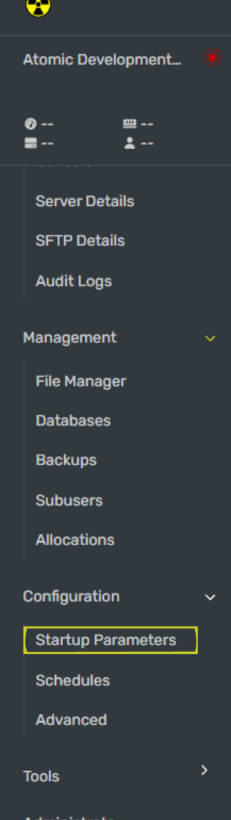 Once you have the Startup Parameters open, enter a password in the RCON Password textbox.
Make sure your rcon\_password is long and secure. If someone is able to gain access to your RCON credentials, they will have full access to your GMod server.
## Step 3: Enter Your RCON Password into In-Game Console
Open server console and enter your RCON password into console. To enable RCON in game:
1. Open console by pressing the \~ key (bind your console key in settings if it doesn't work)
2. Type `rcon_password_[yourpasswordhere]` (Replace the \[yourpasswordhere] with the password you set in the Startup Parameters back in Step 2)
3. Type `rcon status` in console to make sure that you configured your RCON correctly.
## Step 4: Restart Your GMod Server
Once you have configured your auto downloaded workshop addons, restart your GMod server for the workshop addons to work.
## How to Disable RCON (GMod)
To disable RCON on a GMod server, you can do so by opening console and typing `rcon_password_` followed by an empty password value. Once you restart your server, RCON will be disabled.
Once you have the Startup Parameters open, enter a password in the RCON Password textbox.
Make sure your rcon\_password is long and secure. If someone is able to gain access to your RCON credentials, they will have full access to your GMod server.
## Step 3: Enter Your RCON Password into In-Game Console
Open server console and enter your RCON password into console. To enable RCON in game:
1. Open console by pressing the \~ key (bind your console key in settings if it doesn't work)
2. Type `rcon_password_[yourpasswordhere]` (Replace the \[yourpasswordhere] with the password you set in the Startup Parameters back in Step 2)
3. Type `rcon status` in console to make sure that you configured your RCON correctly.
## Step 4: Restart Your GMod Server
Once you have configured your auto downloaded workshop addons, restart your GMod server for the workshop addons to work.
## How to Disable RCON (GMod)
To disable RCON on a GMod server, you can do so by opening console and typing `rcon_password_` followed by an empty password value. Once you restart your server, RCON will be disabled.