> ## Documentation Index
> Fetch the complete documentation index at: https://docs.atomicnetworks.co/llms.txt
> Use this file to discover all available pages before exploring further.
# How to Make a Private Server in GMod
> Learn about how to make your GMod server private on an Atomic Networks service.
Until you are ready to launch, or if you only want certain people to play, it's always a good idea to make a GMod private server. This way, people that you don't want to see your server won't be able to connect. To make a GMod server private, follow the steps below.
## Step 1: Navigate to Atomic Panel
Click [here](https://panel.atomicnetworks.co/login) to navigate to Atomic Panel. You can log in using your account credentials that you received following checkout. The credentials email is sent to the email address on file in the Billing Panel.
If you're not a current Atomic Networks client, [claim your Free GMod Server Hosting](https://atomicnetworks.co/garrys-mod-server-hosting) to get started on a GMod server for your favorite gamemode in less than half an hour. If you're already hosting with another GMod service, see [how we offer way more performance for less.](https://atomicnetworks.co/garrys-mod-server-hosting)
## Step 2: Navigate to the File Manager under Management
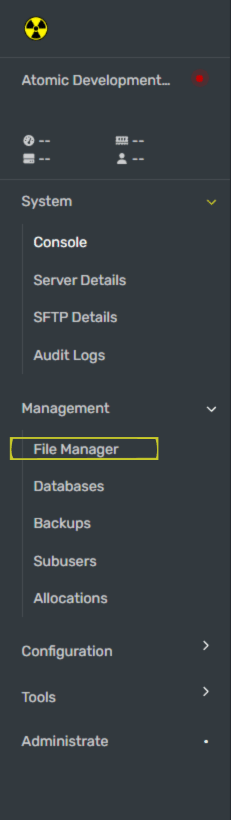 In the file manager, navigate to the pathway called `/home/container/garrysmod/cfg/server.cfg`
## Step 3: Set `sv_password` in the `server.cfg` File - Put a Password on a GMod Server
You will find your password in the config file. The hostname is the name that you set for your server. If you have not edited your server.cfg file yet, you will find this variable around Line 5 of the server.cfg file. Do not delete or remove the Quotation Marks (" ") when setting your server name.
We recommend at least 10 characters with a random mix of letters and symbols. Use passwords between the range of 16-32 characters as best practice. Click [here](https://www.random.org/passwords/) for a link to an offline password generator.
## Step 4: Restart Your GMod Server
Once you have configured your GMod server to be private, restart your server.
In the file manager, navigate to the pathway called `/home/container/garrysmod/cfg/server.cfg`
## Step 3: Set `sv_password` in the `server.cfg` File - Put a Password on a GMod Server
You will find your password in the config file. The hostname is the name that you set for your server. If you have not edited your server.cfg file yet, you will find this variable around Line 5 of the server.cfg file. Do not delete or remove the Quotation Marks (" ") when setting your server name.
We recommend at least 10 characters with a random mix of letters and symbols. Use passwords between the range of 16-32 characters as best practice. Click [here](https://www.random.org/passwords/) for a link to an offline password generator.
## Step 4: Restart Your GMod Server
Once you have configured your GMod server to be private, restart your server.